Export your video vertical or square and under three minutes, then upload it through the YouTube app’s Create button or YouTube Studio’s Create menu — YouTube classifies it as a Short automatically, with no toggle to flip.

What Makes a Video a Short (Not Just a Short Video)
Length alone does not make a Short. Classification happens on YouTube’s side, automatically, based on the shape of the frame and the runtime of the file.
According to YouTube’s Help Center, YouTube automatically categorizes an uploaded video as a Short if it has a square or vertical aspect ratio and is up to three minutes long. The same YouTube Help page states that the three-minute rule applies to videos uploaded on or after October 15, 2024 on standard YouTube channels. Anything you published before that date keeps the limits that were in force at the time.
| Signal | Lands in the Shorts feed | Stays a regular video |
|---|---|---|
| Aspect ratio | Square (1:1) or vertical (9:16) | Horizontal (16:9) |
| Duration | Up to three minutes | Longer than three minutes |
| Upload path | YouTube app or YouTube Studio | YouTube app or YouTube Studio |
| Who decides | YouTube, automatically | YouTube, automatically |
A 40-second horizontal clip is not a Short. It is a short video, which is a different thing entirely, and it will sit on your channel page like any standard upload.
There is no checkbox labeled "make this a Short." You control the inputs — frame shape, runtime, export settings — and the platform reads them. That is why the export step matters more than anything you type into the description box.
Step 1 — Export Your File So YouTube Recognizes It as a Short
Time needed: five to ten minutes. What you need: your finished cut in any editor that lets you set a custom resolution.
Set your project canvas to vertical before you export, not after. Fixing orientation on the way out usually bakes in black or blurred bars, and those bars travel with the file forever.
Use these export settings as a baseline:
- Resolution: 1080 × 1920 pixels (9:16), or 1080 × 1080 if you are deliberately going square
- Frame rate: 30 or 60 fps, matching your source footage
- Codec and container: H.264 video, AAC audio, MP4 file
- Duration: trim to under three minutes with a few seconds of margin so rounding never pushes you over
- Captions: burn them in or keep a separate caption file, but check they sit inside the safe area
YouTube’s Help Center puts the overall upload ceiling for any video file, including a Short, at 256 GB or 12 hours, whichever is less. You will never get close with a vertical clip, but it is useful context if you also upload long-form masters from the same machine.
One account detail catches new creators off guard. YouTube Help notes that unverified accounts can only upload videos up to 15 minutes long by default, so verify your account by phone before you start pushing longer source files through Studio.
Name the export file something you can recognize in a crowded downloads folder. Future you, uploading three Shorts in a row on a Friday, will appreciate it.
Step 2 — Upload a Short From Your Phone in the YouTube App
Time needed: about three minutes. What you need: the YouTube app, signed in to the right channel, and your exported file in the camera roll.
YouTube Help confirms that Shorts of up to three minutes can be uploaded either through the YouTube mobile app or through YouTube Studio on desktop, so neither route is second-class.
The mobile flow runs like this:
- Open the YouTube app and tap the + (Create) button in the bottom bar.
- Choose Create a Short.
- Tap the gallery thumbnail in the lower-left corner to pull in your exported file instead of recording live.
- Trim the clip on the timeline if you need to shave the tail.
- Add text, sound, filters or voiceover in the editor, then tap Next.
- Write your title, set the audience, and tap Upload Short.
If your source is already on your channel, there is a second path. According to YouTube’s Android Help page, when you turn an already-published long-form video into a Short with the Remix tool, you can select up to 60 seconds of that video.
Keep the phone on Wi-Fi for the upload. A dropped cellular connection mid-upload forces you to start the whole flow again, editor choices included.

Step 3 — Upload a Short From Desktop in YouTube Studio
Time needed: about five minutes. What you need: a browser, your vertical MP4, and desktop access to YouTube Studio.
Desktop is the better route when you edit on a computer, because you skip the file transfer to your phone entirely. The upload dialog is the same one you use for long-form videos.
- Go to YouTube Studio and sign in to the channel you are publishing from.
- Click Create in the top-right corner, then Upload videos.
- Drag your vertical MP4 into the dialog, or click to browse for it.
- Fill in the title and description while the file processes in the background.
- Set Audience — this is required, and you cannot publish without answering the made-for-kids question.
- Work through visibility, then click Publish or schedule a time.
Double-check the thumbnail preview in the upload dialog. If the preview looks like a wide rectangle with empty space on both sides, your export is horizontal and the file will not be treated as a Short.
There is no separate "Shorts uploader" on desktop. You use the standard flow and let the aspect ratio and runtime do the classifying, exactly as described in YouTube’s three-minute Shorts documentation.
Upload in a tab you can leave open. Closing the browser before processing finishes cancels the job.
Step 4 — Add the Title, Description, and Settings That Keep It in the Shorts Feed
Time needed: three to five minutes per upload.
Metadata does not change the format classification. It changes whether anyone who sees the Short understands it, searches for it later, or subscribes because of it.
- Title: write it to read fully on a phone screen — roughly 40 to 50 characters is a safe working ceiling, as advice rather than a rule.
- Description: two or three lines of plain context, plus the one link you actually want clicked.
- Hashtags: a couple of topical tags are fine; the #Shorts tag does not override the aspect-ratio and duration signals.
- Audience: answer the made-for-kids question honestly, because "yes" removes comments and personalized ads.
- Comments: leave them on unless the topic genuinely invites trouble; replies are cheap distribution.
- Playlists: add the Short to a themed playlist so it keeps working on your channel page.
Avoid stuffing keywords into the title to catch search traffic. Shorts viewers swipe, and a title that reads like a tag list gets swiped past.
If you schedule rather than publish immediately, pick a slot you can actually be online for. Being present for the first wave of comments is a small, repeatable advantage.
Step 5 — Publish and Confirm YouTube Classified It as a Short
Time needed: two minutes after processing completes.
Publishing is not the finish line. Verification is, and it takes one look at your Content tab.
Open YouTube Studio, go to Content, and switch to the Shorts tab. If your upload appears there, YouTube read it as a Short. If it only appears under Videos, the file was horizontal, too long, or both.
A second check works on mobile. Open your channel in the YouTube app, tap the Shorts shelf, and confirm the clip plays in the swipeable vertical player rather than the standard watch page.
The stakes for getting this right are large. YouTube CEO Neal Mohan said in 2025 that YouTube Shorts averages over 200 billion daily views, according to the YouTube Blog — a horizontal export locks you out of that surface completely.
You cannot convert an already-uploaded horizontal video into a Short by editing its metadata. Re-export at 9:16, upload the new file, and delete or unlist the mistake.
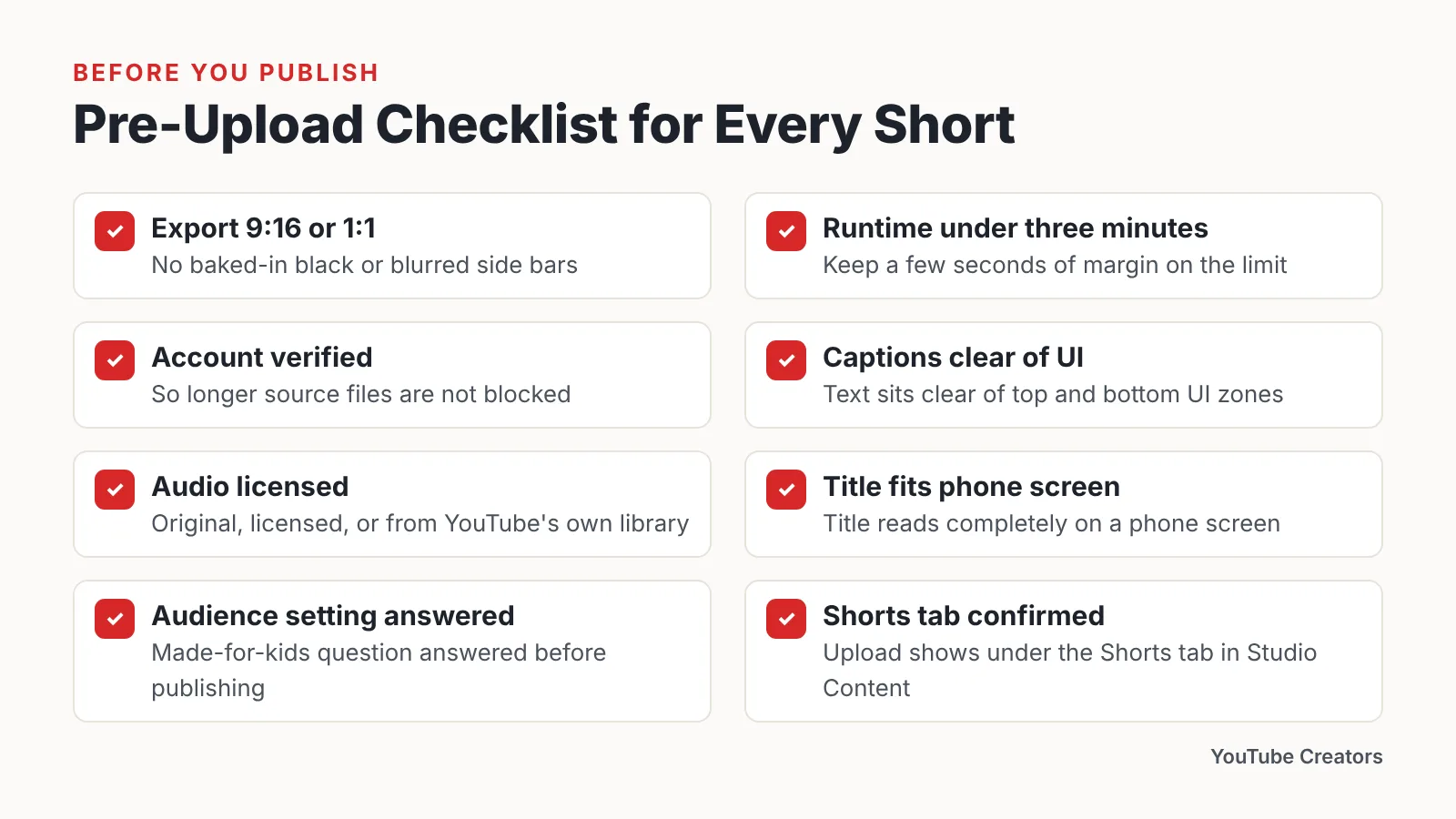
Pre-Upload Checklist for Every Short
Run this before you hit publish. It takes under a minute once the habit sticks.
- ☐ Export is 9:16 or 1:1, with no baked-in black or blurred side bars
- ☐ Runtime is comfortably under three minutes
- ☐ Account is verified, so longer source files are not blocked
- ☐ Captions and on-screen text sit clear of the top and bottom UI zones
- ☐ Audio is licensed, original, or pulled from YouTube’s own library
- ☐ Title reads completely on a phone screen
- ☐ Audience setting answered
- ☐ Comments and playlist decisions made
- ☐ Post-publish: the upload shows under the Shorts tab in Studio Content
Monetization context belongs on this list too, if growth is the goal. YouTube Help states that a channel can qualify for the YouTube Partner Program through Shorts with 1,000 subscribers plus 10 million qualified Shorts views in the last 90 days.
Keep the checklist somewhere you will see it during export, not after. Most Shorts problems are export problems wearing a disguise.
Common Mistakes That Keep Your Upload Out of the Shorts Feed
The most common failure is a horizontal export dressed up to look vertical. Creators drop a 16:9 clip onto a 9:16 canvas, fill the gaps with a blurred copy of the footage, and export — but if the underlying file is still 16:9, YouTube reads it as a regular video. Avoid it by setting the sequence to 1080 × 1920 before you edit, so every element is framed for vertical from the first cut.
Other recurring errors:
- Running past three minutes. A clip at three minutes and two seconds is a regular video, full stop.
- Uploading to the wrong channel. Check the avatar in the top-right of Studio before you drag the file in.
- Leaving the audience question for later. You cannot publish without it, and half-finished uploads pile up in drafts.
- Expecting Shorts views to fund the long-form path. According to YouTube Help, watch time earned from Shorts views in the Shorts Feed does not count toward the 4,000 public watch hours YPP threshold.
- Deleting and re-uploading repeatedly. Fix the export once, upload once, and let the clip breathe.
Treat the first three Shorts on a new channel as calibration. Check the Studio Content tab each time, confirm the format stuck, and only then start batching uploads.
Frequently asked questions
How long can a YouTube Short be in 2026?
According to YouTube’s Help Center, a video is automatically categorized as a Short when it has a square or vertical aspect ratio and is up to three minutes long. That same page notes the three-minute rule applies to videos uploaded on or after October 15, 2024 on standard YouTube channels.
Can I upload a Short from my computer instead of my phone?
Yes. YouTube Help confirms that Shorts of up to three minutes can be uploaded either through the YouTube mobile app or through YouTube Studio on desktop. Use Studio’s Create button, upload your vertical MP4, and the platform classifies it automatically based on aspect ratio and runtime.
Do I need to add #Shorts to the title or description?
No. Classification depends on aspect ratio and duration, as YouTube’s Help Center describes, not on a hashtag. Adding #Shorts does nothing harmful, but it will never rescue a horizontal export or a clip that runs past the three-minute limit.
Can I turn an old long-form video into a Short?
Yes, using the Remix tool. YouTube’s Android Help page states that when you turn an already-published long-form video into a Short with Remix, you can select up to 60 seconds of that video — shorter than the three-minute ceiling for a fresh upload.
Why did my vertical video upload as a regular video?
Almost always the export, not the upload. If your editor rendered a 16:9 file with blurred side bars added as visual filler, the underlying frame is still horizontal. Re-export at 1080 × 1920, upload the new file, and verify it appears under the Shorts tab in YouTube Studio.
Sources
- Understand three-minute YouTube Shorts – YouTube Help
- Create YouTube Shorts from your videos – Android – YouTube Help
- Upload videos longer than 15 minutes – Computer – YouTube Help
- Get started creating YouTube Shorts – YouTube Help
- The YouTube Partner Programme overview and eligibility – Computer – YouTube Help
- Neal Mohan at Cannes Lions 2025: What 20 years of YouTube reveals about creativity’s future – YouTube Blog
This article was drafted with AI assistance and published by the YouTube Creators Editorial Team after its facts were checked against the sources listed above.