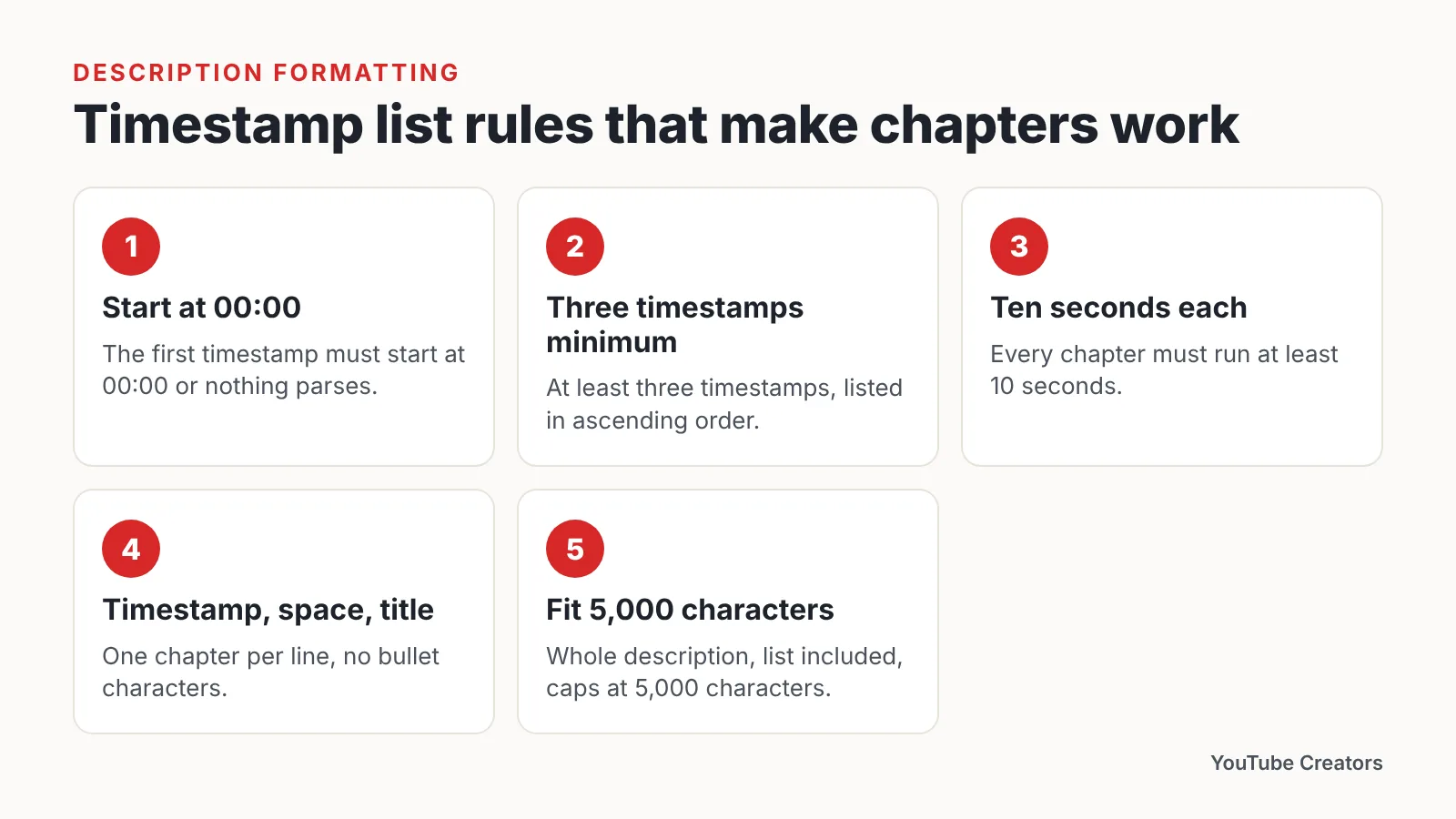
Add chapters by typing a timestamp list in your video description, starting at 00:00, with at least three timestamps in ascending order and each segment at least 10 seconds long. Chapters fail when any of those rules breaks.
What YouTube chapters are and when they’re worth adding
A chapter is a named section of your progress bar. Viewers hover, read the label, and jump. The whole feature runs off a plain list of timestamps you type into the description field — no plugin, no re-upload, no third-party tool.
The payoff is highest on videos people watch with a goal in mind. Someone looking for the part where you install the lens, compare two prices, or answer a specific question will either find it fast or leave.
Worth adding chapters:
- Tutorials with distinct phases (setup, build, test, troubleshooting)
- Reviews that cover several products, specs, or price tiers
- Interviews and podcast episodes where topics shift every few minutes
- Recipe, repair, and software walkthroughs viewers return to mid-task
- Q&A videos where each question stands alone
Usually not worth it:
- Short, tightly edited story videos with no natural sections
- Vlogs where cutting away kills the point
- Any video where the segments would be too brief to label honestly
Google Search Central’s video structured data documentation says Google prioritizes key moments that creators define themselves, including through the YouTube description, over segments it detects automatically. Writing your own list is therefore not busywork. You are telling two different systems — the player and search — where the useful parts are.
Step 1 — Check that your channel and video are eligible for chapters
Time: about five minutes. What you need: YouTube Studio on a desktop browser and one uploaded video, draft or public.
Open any video in Studio, scroll to the description box, and look for the automatic chapters checkbox under the details. If that control is missing entirely, the problem is account-level, not formatting, and no amount of retyping timestamps will fix it.
YouTube’s Video Chapters help page states that chapters can be unavailable entirely if the channel has active strikes or if the content may be inappropriate for some viewers. Check your channel dashboard for strikes before you spend an hour rewriting a description.
Creators who still don’t see chapters are told by YouTube Help to apply for access to YouTube’s Advanced features. That application lives in Studio under channel settings, and it usually asks for either ID verification or enough channel history.
YouTube Help says active channels that follow the Community Guidelines can usually rebuild sufficient channel history for advanced features within 2 months, without ID verification. Keep uploading on your normal schedule while you wait. Verification by ID is the faster route if you want chapters on the next upload rather than the next quarter.
Step 2 — Plan your chapter breaks while you’re still editing
Time: 10 to 15 minutes added to your edit. What you need: your editing timeline and somewhere to jot start times.
Mark your breaks on the timeline, not after export. Every time you place a transition between topics, note the timecode. Doing it later means scrubbing through the whole video a second time.
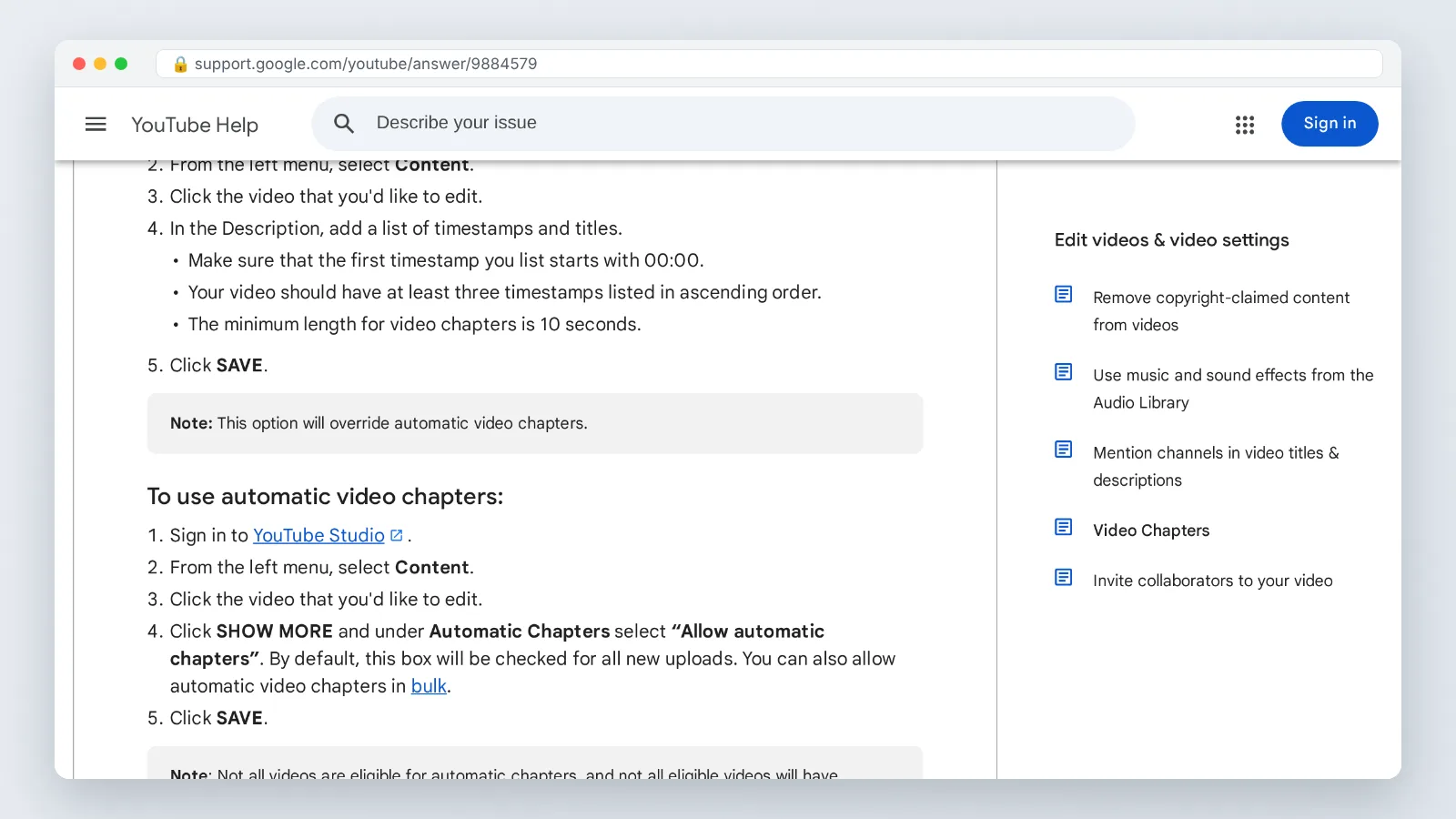
YouTube’s Video Chapters help page states that every chapter must run at least 10 seconds. That single rule kills more chapter lists than anything else, because quick intros, sponsor reads, and one-line answers routinely come in under it.
YouTube also requires at least three timestamps, listed in ascending order, before it will turn a description list into chapters. A video with an intro and one topic will not qualify. Either find a third real break or skip chapters for that upload.
As a working rule, aim for four to eight chapters on a ten-minute video and roughly one every three to five minutes on long interviews. Too many breaks turn the progress bar into confetti. Too few and viewers go back to dragging the scrubber blindly.
Name each break in your edit notes using the words a viewer would search, not your internal shorthand. "Fixing the audio drift" beats "section 3b."
Step 3 — Write the timestamp list in your video description
Time: about five minutes. What you need: your break list from Step 2 and the description field in YouTube Studio.
YouTube’s official instructions for manual chapters require that the first timestamp in the description start at 00:00. Miss that and the entire list stays plain text, even if every other line is perfect.
Format each line as a timestamp, a space, then the title. One chapter per line, no bullet characters:
“`
00:00 What you’ll build
00:48 Tools and parts
03:15 Wiring the switch
07:02 Testing for continuity
11:30 Common wiring mistakes
“`
Use `MM:SS` under an hour and `HH:MM:SS` past it. Hyphens, em dashes, or pipes after the timestamp are fine; what matters is that the timestamp sits at the start of the line and the times climb in order.
A YouTube video description can hold a maximum of 5,000 characters, according to YouTube’s Edit video settings help page, and your whole chapter list has to fit inside that space alongside links and credits. Long podcast lists eat that budget fast, so trim labels to a few words each.
Put the chapter list high in the description, under your opening two lines of context. Viewers who expand the description should hit the list before your social links.
Step 4 — Save in YouTube Studio and confirm the chapters on the watch page
Time: three minutes. What you need: a desktop browser and your phone.
- Paste the list into the description field in Studio and click Save.
- Open the public watch page in a new tab and hard-refresh it.
- Hover over the progress bar and confirm it is split into segments with your labels.
- Expand the description and check that each timestamp is now a blue clickable link.
- Open the same video on your phone and tap the title area to see the chapter list there.
If the timestamps are blue links but the progress bar is still one unbroken line, the list is being read as plain jump links rather than chapters. That is almost always a rule break from Step 2 or Step 3 — a missing 00:00, a stray line out of order, or one segment under the minimum length.
Give the watch page a minute and reload rather than refreshing instantly. Processing on long uploads can lag behind your save by a short window.
Check one more thing before you move on: that the labels read sensibly out of context. A viewer scanning your chapter list has not watched the video yet.
Step 5 — Decide whether to keep automatic chapters switched on
Time: two minutes per video. What you need: the video details page in Studio.
YouTube’s Video Chapters help page states that the "Allow automatic chapters" setting is switched on by default for all new uploads. You do not have to touch it for your own list to win.
Adding your own timestamp list in the description overrides YouTube’s automatic chapters for that video, according to the same YouTube help page. Manual beats automatic, every time, on the videos where you bothered to write a list.
| Manual chapters | Automatic chapters | |
|---|---|---|
| Where they come from | Your description timestamps | YouTube’s analysis of the video |
| Wording control | Full | None |
| Effort per video | 10–20 minutes | Zero |
| Priority on the watch page | Overrides automatic | Used only when no valid manual list exists |
| Best for | Tutorials, reviews, interviews | Back catalog, casual uploads |
Leave the setting on. It costs nothing and it covers the uploads where you run out of time, plus the hundred older videos you will never go back and retrofit.
Turn it off only when the generated labels misrepresent the content — for example on a video where a disclaimer segment gets labeled as the main topic.
Pre-publish chapter checklist
Run this before you hit Publish. It takes under two minutes once the list is written, and it catches the formatting faults that silently downgrade chapters to plain links.
- [ ] The first line starts at exactly `00:00`
- [ ] There are at least three timestamps in total
- [ ] Timestamps climb in ascending order with no duplicates
- [ ] No segment is shorter than 10 seconds
- [ ] Each line has a space between the timestamp and the title
- [ ] Titles describe content, not structure ("Choosing a mic" over "Part two")
- [ ] The whole description, list included, stays within the 5,000-character limit
- [ ] The list sits near the top of the description, above links
- [ ] Hovering the progress bar on the live watch page shows segments
- [ ] The phone app shows the same chapter list
- [ ] Your channel has no active strikes blocking the feature
Keep a plain-text template of your usual chapter structure for your recurring format. Pasting a skeleton and editing times is faster than typing from scratch, and it stops you from forgetting the 00:00 line on upload day.
Common mistakes: why your chapters don’t show up
The single most common failure is starting the list at `00:01` or `00:15` because you wanted to skip the cold open. YouTube’s official instructions require the first timestamp to start at 00:00, so the fix is to label your intro honestly — `00:00 Cold open` — and let the real first topic become chapter two.
Other faults that break a list:
- Fewer than three timestamps. YouTube requires at least three timestamps in ascending order before a description list becomes chapters, so a two-item list stays plain text.
- A segment under the minimum length. Every chapter must run at least 10 seconds; merge a too-short sponsor mention into the chapter around it.
- Times out of order. One mistyped `01:40` after `02:10` invalidates the sequence. Read the list top to bottom before saving.
- No space after the timestamp. `00:00Intro` is not parsed. Add the space.
- Pasting from a word processor. Smart quotes and non-breaking spaces survive the paste and break the line. Paste through a plain-text editor first.
- Account-level blocks. Chapters can be unavailable entirely when a channel has active strikes or the content may be inappropriate for some viewers, per YouTube Help, and formatting cannot override that.
When a list refuses to work and every rule checks out, delete it, save, re-paste it, and save again. A stale cached description is the quiet culprit more often than you would expect.
Frequently asked questions
Why do my timestamps show as blue links but not as chapters?
Blue links mean YouTube parsed the times but rejected the list as chapters. Check the three hard rules from YouTube’s help page: the first timestamp must start at 00:00, you need at least three timestamps in ascending order, and every chapter must run at least 10 seconds.
How many chapters should a ten-minute video have?
There is no official limit, so treat this as judgment rather than a rule. Four to eight chapters works well for a ten-minute tutorial, since each segment stays long enough to clear the 10-second minimum that YouTube requires and the labels remain readable on a phone.
Do chapters work on YouTube videos I published last year?
Yes. Edit the description of any existing public video, add a valid timestamp list starting at 00:00 with at least three entries, and save. The chapters appear on the watch page after a refresh, with no re-upload and no loss of views, comments, or watch time.
Should I turn off automatic chapters if I write my own?
No need. YouTube Help says adding your own timestamp list in the description overrides automatic chapters for that video, and the "Allow automatic chapters" setting is switched on by default for all new uploads, so leaving it on only helps the videos where you skip writing a list.
What if YouTube Studio shows no chapters option at all?
That is an account-level block rather than a formatting problem. YouTube Help tells creators without access to apply for Advanced features, and says active channels following the Community Guidelines can usually rebuild sufficient channel history within 2 months, without ID verification.
Sources
This article was drafted with AI assistance and published by the YouTube Creators Editorial Team after its facts were checked against the sources listed above.